Echallan Check Lahore – Verify Punjab Police Traffic Challan Online (2025)
Have you ever been surprised by an unexpected traffic challan in Lahore? Many drivers receive e-challans without realizing it, only to find out later when trying to renew their vehicle documents. The good news is that checking your echallan online in Lahore is now quick and easy.
🚗 Punjab E-Challan Checker
Check your traffic e-challans directly on official PSCA portal
✅ Clicking the button will open the official PSCA website in a new tab where you can check your e-challan
This guide explains exactly how to verify your challan using your vehicle number or CNIC through the Punjab Safe Cities Authority (PSCA) system.
How to Check Your Echallan Online in Lahore (PSCA Portal Guide)
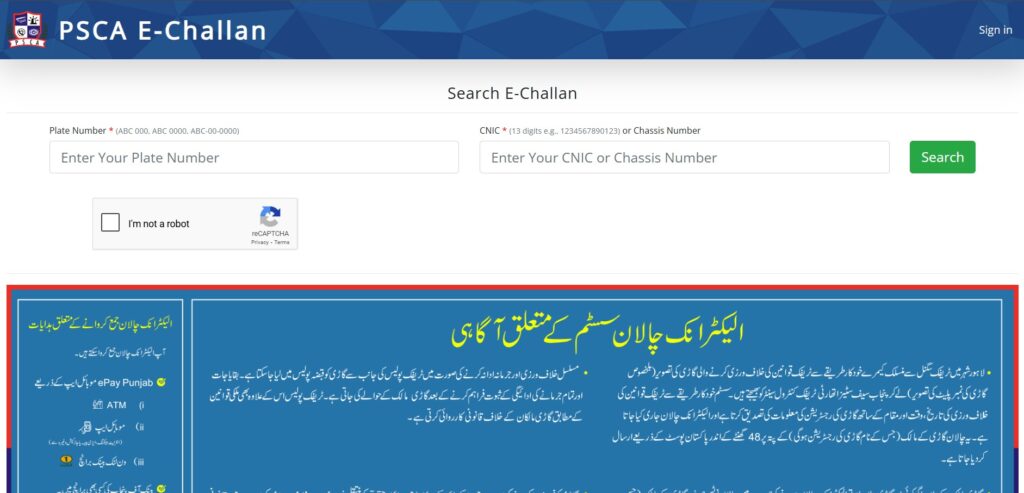
You can now view your Punjab Police e-challan from your phone or computer in just a few minutes.
Follow these simple steps:
- Visit the official Punjab Safe Cities Authority website: https://echallan.psca.gop.pk
- Enter your vehicle registration number or CNIC in the given field.
- Click on “Check Challan.”
- Your challan details will appear instantly, including the challan number, violation type, fine amount, and issue date.
Tip: Always double-check that the vehicle number is entered without spaces (e.g., LEB1234).
Note: The PSCA system updates data directly from the Punjab Police traffic enforcement network, ensuring 100% accurate and official results.
About the Punjab Safe Cities Authority (PSCA)
The Punjab Safe Cities Authority (PSCA) is responsible for managing Lahore’s smart traffic monitoring system. Using hundreds of advanced cameras placed across major roads and intersections, PSCA automatically detects violations like red-light jumps, wrong turns, and driving without helmets.
Since the launch of the e-challan system in 2021, PSCA has issued over 1.2 million e-challans in Lahore. These digital challans are automatically recorded in the Punjab Police database and linked to the vehicle owner’s record.
This system has improved transparency and reduced manual ticketing, helping to make Lahore’s roads safer and more disciplined.
Types of Traffic Violations Captured in Lahore
Types of Traffic Violations Captured in Lahore
Traffic fines in Lahore are issued under the Punjab Police e-challan system managed by the Punjab Safe Cities Authority (PSCA). The system uses high-resolution cameras installed at major intersections and highways to automatically detect violations. Each challan is verified, logged, and sent to the vehicle owner’s registered address.
Here’s a comparison showing how traffic fines in Lahore differ from Karachi, based on the latest PSCA and city traffic data:
| Violation Type | Motorcycle Fine (Rs.) | Car Fine (Rs.) |
| Driving without a driving license | 200 | 500 |
| Riding a motorcycle without a crash helmet | 2,000 | – |
| Violation of traffic signals | 300 | 500 |
| Pillion riding by more than two persons | 300 | – |
| Violation of parking rules | 2,000 | 2,000 |
| Using a mobile phone while driving | 200 | 500 |
| Driving without a fitness certificate | 200 | 500 |
| Driving wrong way in a one-way street | 200 | 2,000 |
Note:
All fines in Lahore are generated automatically through the PSCA camera network, ensuring accuracy and transparency. Each challan is linked directly to the registered vehicle number and stored in the Punjab Police e-challan database.
These penalties encourage responsible driving and have helped reduce signal violations and road accidents across the city.
How to Download a Duplicate E-Challan Slip in Lahore
Lost your traffic challan slip or didn’t receive it at your address? No problem. You can easily download a duplicate e-challan through the official PSCA e-challan portal.
Here’s how to do it:
- Visit https://echallan.psca.gop.pk
- Enter your vehicle number or CNIC
- Click “Check Challan”
- Once challan details appear, select “Download / Print”
- Save the challan slip or print it for records
This duplicate slip can be used to clear your challan at designated Bank of Punjab branches or traffic enforcement centers across Lahore.
Pro Tip: Keep a soft copy of your e-challan saved on your phone to avoid future delays or confusion.
How to Check Echallan Using CNIC or Vehicle Number
The Punjab Police e-challan system offers two simple ways to check your echallan — by vehicle number or CNIC.
1. Using Vehicle Number
- Open https://echallan.psca.gop.pk
- Enter your registered vehicle number (e.g., LEB1234 – without spaces)
- Click “Search”
- View all pending challans instantly
2. Using CNIC
- Enter your valid CNIC number without dashes
- The system displays all challans linked to vehicles under your name
This feature is especially helpful for families or fleet owners managing multiple vehicles.
Tip: Always verify your challan details directly from the PSCA website to avoid fake or third-party portals.
Common Problems and Their Fixes
| Issue | Possible Cause | Solution |
| E-challan not showing online | System update delay | Wait 24–48 hours and check again |
| Wrong vehicle details | Record mismatch or old ownership | Contact PSCA helpline or nearest traffic police office |
| No challan found | No active traffic violations | Continue driving safely |
| Duplicate challan issued | Database overlap | Keep your previous paid receipt for verification |
If a challan seems incorrect, visit the nearest Traffic Police Licensing Center or contact PSCA support through their helpline for quick resolution.
Why Digital Challans Matter for Lahore’s Road Safety
The digital challan system in Lahore is more than a traffic fine tool — it’s a step toward a safer and smarter city. The Punjab Safe Cities Authority (PSCA) has installed over 600 AI-enabled cameras across Lahore that record violations in real time.
Since 2021, Lahore has seen:
- A 40% decrease in red light violations
- A 30% increase in helmet compliance
- Thousands of verified challans settled through PSCA’s system each month
These efforts encourage discipline and reduce on-road accidents. Regularly checking your echallan online in Lahore ensures transparency and keeps your driving record clean.
FAQs – Echallan Check Lahore
Q1: How to check e-challan in Lahore online?
Visit https://echallan.psca.gop.pk and enter your vehicle number or CNIC to view your challan details.
Q2: How to download a duplicate e-challan slip?
Enter your vehicle or CNIC on the PSCA portal, view challan details, and click “Download / Print.”
Q3: Can I check my challan using CNIC?
Yes, all challans linked to your CNIC are viewable on the PSCA portal.
Q4: How long does it take for a new challan to appear online?
It usually updates within 24 hours of being captured by PSCA traffic cameras.
Q5: What if I get a wrong challan notice?
Contact PSCA or visit the nearest Lahore Traffic Police office with your registration documents for correction.